30 October 2014

Tech Thursday: Keep Your Desktop Organised!

Dear readers,
Today I am linking again with the Teaching Trio for their weekly Technology Thursday linky.

I am addicted to wallpaper organisers and am always looking out for pretty, feminine ones ;). A few months ago, I found this beautiful wallpaper organiser on the My Little Paris website, and I had to share it with you:

Click on the images to download :)
http://www.mylittleparis.com/operation/site-relooker-votre-ordinateur/index.html

It is in French, but you can easily change the headers on any photo editor. For the font addicts out there, the font used is AMATIC and you can download it here :)

I also love this wallpaper for when I'm on holiday... or for those days when I wish I was on holiday ;)

http://www.mylittleparis.com/geekette/fond-d-ecran-vacances

Guess which wallpaper I am using right now?!
Feel free to comment below if you have found other wallpaper organisers you love :)

Thanks for reading and don't forget to check out other bloggers' tech tips by clicking on the button below:
http://teachingtrio.blogspot.com/2014/10/technology-thursday-103014-blocking-ads.html

27 October 2014

Plickers

Last week, I found out about a really cool App called Plickers through Luv My Kinders and it is amazing! You first need to register on their website, and print and laminate a set of cards. There are various packs to choose from and the cards look like this:


You then create your classes, allocate a card number for each child, type your multiple choice or true-false questions and you're away!

Each side of the shape on a card is labelled A, B, C or D. As you ask your question, pupils hold the shape so that the letter they have selected is at the top of the shape. You then scan the room with your iPad and it will instantly pick up the pupils' answers! How cool is this?!

You can see straight away how many children got the correct answer and the names of the pupils will show up in green or red accordingly.

What could be improved: at the moment, you cannot view an individual child's data, making it quite hard to evaluate a child's progress. However, this is a feature they are likely to add very soon due to the number of teachers asking for it! If you too think this would be a great feature, please vote on their forum here.

26 October 2014

Sunday Scoop!

Dear readers,
I am linking up again with the Teaching Trio for their Sunday Scoop. So let's take a peek at my week:


Have to do:
q Need I say more?!

q Last Friday, we noticed that our chest freezer accidently switched off as the plug  slightly pulled out of its socket. It had already started to thaw so EVERYTHING had to be taken out to be cooked immediately!!! Yes, all 10 kilos of meat!!! Needless to say that I have been cooking all weekend, on top of marking & grading my pupils' exams. Luckily, I LOVE cooking and it made a pretty good excuse to emerge from my pile of exam papers every now and then!

q Tomorrow, I have to go to attend our yearly French curriculum meeting for international schools in Kenya. I am not looking forward to the 6 hour journey on bumpy roads, but I love to spend time with other teachers and share ideas :)
 
Hope to do:
q The weather has been beautiful this weekend so we enjoyed a very nice Sunday lunch in the garden:)
 Who's eating the cherry tomatoes??!
 
With all the cooking I have been doing, we now have lots of yummy food waiting to be eaten :) so I'm hoping that we'll make the most of our second weekend off and enjoy another lunch al fresco!

q I want to add 'Pin it' and 'Scroll to the top' buttons to my blog so I'm hoping to do that this week. I have saved a few tutorials and just need to find some time to tick these items off my blog's to-do list!
 
Happy to do:
A couple of months ago, I left my computer cable plugged in overnight and the charger overheated... As I live in a remote part of Kenya, I haven't been able to buy a replacement, but one of my colleague's come to the rescue and is coming back tonight with my new cable!!! I can't wait to start using all the clip arts I have been purchasing and get a new TpT product done in the next few weeks :)

Thanks for reading! Visit the Teaching Trio to see what other bloggers are up to this week (click on the image below!)

http://teachingtrio.blogspot.com/2014/10/the-sunday-scoop-is-based-on-popular-3.html

24 October 2014

iFakeText

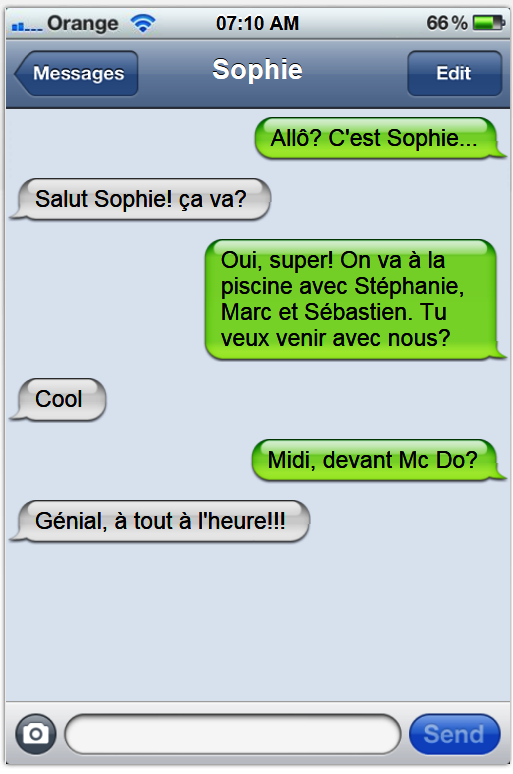
iFakeText is a great website which enables you & your pupils to create fake iPhone text conversations such as this one:

www.ifaketext.com

You can use this site to create a dialogue to introduce a certain topic, or get the pupils to create their own fake text messages. They can screenshot their text conversations and upload them onto Padlet or a similar platform for you to assess their work.

What could be improved: the accents will not show up properly when using the download option, so pupils will need to screenshot their conversations instead :(


23 October 2014

TECH THURSDAY: HOW TO FIND ANY WEB FONT YOU LIKE

Dear readers,
Today I am linking with the wonderful Teaching Trio for their weekly linky called Technology Thursday. There is a different focus each week and this week, we are sharing great tech tips so keep reading!!!
http://fount.artequalswork.com/
As some of you might have noticed, I recently updated my blog design to make it look more personal. As well as the rather boring header, one of the things I didn't like about my original blog template was the title fonts, they were plain and very small...
I had used Whatfontis  and What the Font! successfully in the past to find a font I loved from a document or a picture, but I wasn't getting anywhere with finding the web font I wanted for my blog titles. Then I discovered Fount, a button which you simply drag onto your bookmarks bar and... voilà!!! All you need to do then is to click on the button every time you see a font you love and hover over the font with the mouse. A window will appear and tell you which font, size, weight & style are used on the page!!!
This button is compatible with Safari, Chrome, Firefox & IE8+.
Thanks for reading and don't forget to check out other bloggers' tech tips by clicking on the button below:
http://teachingtrio.blogspot.com/2014/10/tech-thursday-how-to-create-great.html
 
Related Posts Plugin for WordPress, Blogger...